"exFAT offset is 6a. On HxD, press CTRL+G and type 0x6a, which will get you to the exact byte that needs to be zeroed." JW0914 on SuperUser
Thursday, September 3, 2020
Clear dirty bit for exfat external drive:

Thursday, September 12, 2019
kmod-nvidia install Centos
Directions on setting up elrepo and the general info about kmod-nvidia
https://elrepo.org/tiki/kmod-nvidia
Answer to kernel dependency error issues: https://serverfault.com/questions/870211/yum-install-kmod-nvidia-kernel-issue
Basically just select the correct kmod-nvidia package for the version of centos that you are installing it on.
https://elrepo.org/tiki/kmod-nvidia
Answer to kernel dependency error issues: https://serverfault.com/questions/870211/yum-install-kmod-nvidia-kernel-issue
Basically just select the correct kmod-nvidia package for the version of centos that you are installing it on.
Wednesday, May 29, 2019
Solution for trouble installing Windows 10 build 1903 "Windows could not configure one or more system components..."
A few days ago 1903 became available for my machine. When I tried to install the update using windows update it gave me the following error dialog in the middle of the install:
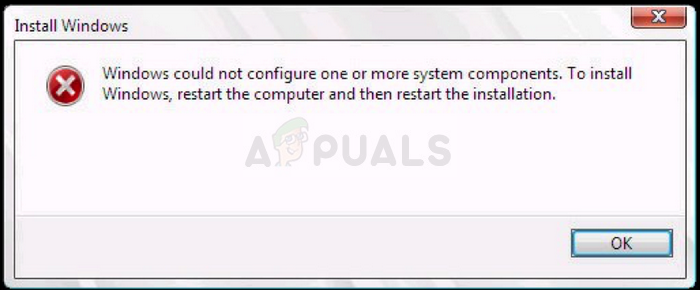
After trying multiple different solutions the one that finally worked was this one:
Here are the important instructions:
I was able to rename the inetsrv folder to inetsrv.old in Windows by:
1. Taking ownership of the folder
2. Stopping the Application Host Helper Service
I then took ownership of the WinSxS folder in order to move the *windows-iis*.* folders to a backup folder on another drive.
With these out of the way, I then used the Windows 10 Update Assistant (rather than the ISO I had created), and updated successfully.
When the updater reached 52% - where it would normally create the error message - it instead went back to 46% for a moment, then jumped back to 54% and continued progressing from there. I'm guessing this is where it needed to rebuild the files I had removed.
Once the update was complete, I deleted the C:\Windows\System32\inetsrv.old folder.
Wednesday, March 13, 2019
Send Window to Back
Windows shortcut to sending window to back is:
ALT + ESC.
Nice alternative to minimizing a window and helps if a maximized window is accidentally clicked on.
Wednesday, January 23, 2019
Visual Studio Code Set Environment Variable for Task
I was unable to find a solution for setting an environment variable for a specific task but setting one for all tasks can be done like this:
..."options": { "env": { "VARIABLE": "value" } }, "tasks": [
...
That would set the environment variable VARIABLE to "value" for all tasks.
Friday, July 27, 2018
Restoring Missing Icons in Visual Studio 2017
If you find that the icons in Visual Studio 2017 are missing, a potential fix is to delete a specific folder that contains icon cache, and then restart Visual Studio 2017. Here's how to do it:
1. Close Visual Studio 2017 if it's currently running.
2. Navigate to the following folder path in File Explorer:
%LocalAppData%\Microsoft\VisualStudio\15.0_[UniqueID]\ImageLibrary\
Replace [UniqueID] with your unique user ID.
3. Delete the `ImageLibrary` folder.
4. Restart Visual Studio 2017.
Upon restarting, Visual Studio 2017 should regenerate the missing icons, restoring them in the interface.
Wednesday, April 11, 2018
Converting float to int using bits
Sometimes it makes sense to place an integer into an array of floats but not want to represent it a float.
GLSL has a function for converting the bits that represent a float to an integer and vise versa:
https://www.khronos.org/registry/OpenGL-Refpages/gl4/html/floatBitsToInt.xhtml
GLSL has a function for converting the bits that represent a float to an integer and vise versa:
https://www.khronos.org/registry/OpenGL-Refpages/gl4/html/floatBitsToInt.xhtml
Monday, April 9, 2018
Fixing MFC compile errors in Visual Studio 2013
If you get the error:
Error 1 error MSB8031: Building an MFC project for a non-Unicode character set is deprecated. You must change the project property to Unicode or download an additional library. See http://go.microsoft.com/fwlink/p/?LinkId=286820 for more information. C:\Program Files (x86)\MSBuild\Microsoft.Cpp\v4.0\V120\Microsoft.CppBuild.targets 376
It can be fixed by installing the Multibyte MFC Library for Visual Studio 2013 which can be found here.
Thursday, April 5, 2018
Recursive grep
search current directory for all files that contain alvin
Found this here:
Monday, February 12, 2018
Monday, September 18, 2017
Fix windows 10 explorer not refreshing:
- In Windows Explorer: choose Tools, Folder Options > Click the Search tab > Check or uncheck ANY option
- Apply.
- If this solves your problem, you can revert to your original setting and the problem will remain solved.
Copied from Bilo's answer on superuser.com
Wednesday, July 19, 2017
Setup VNC on linux
ssh into machine you would like to VNC into
run vncserver and setup a password
login to the vnc desktop that is printed out by the vncserver command.
run vncserver and setup a password
login to the vnc desktop that is printed out by the vncserver command.
Thursday, June 22, 2017
Hide Visual Studio "External Dependencies" folder
In Visual Studio 2010 and up there is a new folder which shows up in each of the projects labeled "External Dependencies". This folder can become unwieldy very quickly and makes using the Solution Explorer harder to use. It is easy to hide/remove this folder.
Tools->Options:
Text Editor->C/C++->Advanced:
In the Browsing/Navigation section there is an option for "Disable External Dependencies Folders"
Set that to True and then restart Visual Studio or reload the solution and the External Dependencies folder should no longer be there.
Tools->Options:
Text Editor->C/C++->Advanced:
In the Browsing/Navigation section there is an option for "Disable External Dependencies Folders"
Set that to True and then restart Visual Studio or reload the solution and the External Dependencies folder should no longer be there.
Thursday, June 15, 2017
ESP8266 AT Commands Notes (Version 1.4 with SDK 2.1.0)
AT
Should return OK
AT+GMR
Return the version information for the board
AT+CIFSR
Return IP info
Single Connection TCP
//Set single connection mode
AT+CIPMUX=0
//Connect to test server
AT+CIPSTART="TCP","test.mosquitto.org",1883
//Check status
AT+CIPSTATUS
//Should return the following:
STATUS:3 //3 is for connected
+CIPSTATUS:0,"TCP","37.187.106.16",1883,10913,0
//Close the connection
AT+CIPCLOSE
Multiple Connection TCP
//Set multiple connection mode
AT+CIPMUX=1
//Connect to the first test server
AT+CIPSTART=0,"TCP","test.mosquitto.org",1883
//Connect to the second test server
AT+CIPSTART=1,"TCP","test.mosquitto.org",8883
//Check status
AT+CIPSTATUS
//Should return the following:
STATUS:3
+CIPSTATUS:0,"TCP","37.187.106.16",1883,44614,0
+CIPSTATUS:1,"TCP","37.187.106.16",8883,44244,0
//Close the connections
AT+CIPCLOSE=0
AT+CIPCLOSE=1
Send/Recieve Data
//Send data using
AT+CIPSEND=100 // 100 is the number of bytes to send.
<Data to send>
//Data from ESP8266
wait for +IPD,100://100 is the number of bytes being sent
//next characters are the data
Friday, June 9, 2017
Friday, May 19, 2017
Delete a ton of files in a ton of folders quickly
Be very careful with these commands as they will delete all files!!
From a windows cmd prompt or batch script.
Delete all files in all child folders without prompting
del /S /q *
Delete all folders recursively without prompting
rmdir /s /q .
From a windows cmd prompt or batch script.
Delete all files in all child folders without prompting
del /S /q *
Delete all folders recursively without prompting
rmdir /s /q .
Wednesday, March 22, 2017
FTP multiple parallel connections to download large file fast.
Some ISP's limit the download speed of a single file. This can lead to slower downloads of large files even though the speed you are paying for is much higher. For example my internet connection is advertised at 50 Mb/s download. When I try to download a large file from an ftp I get speeds around 600 KB/s or to put it in the same units as the ISP rate, 4.8 Mb/s. In order to get around that limitation I have to download the file using multiple connections.
LFTP is an application for linux that has an option for multiple parallel download connections. It can be used on windows through the cygwin application (https://www.cygwin.com/).
Command to run lftp:
lftp <username>@<server>:<port>
Then to download a file using multiple connections:
pget -n <number of connections> <filename>
This will use up bandwidth on the server so be careful to not use too many connections if the server has limited bandwidth.
LFTP is an application for linux that has an option for multiple parallel download connections. It can be used on windows through the cygwin application (https://www.cygwin.com/).
Command to run lftp:
lftp <username>@<server>:<port>
Then to download a file using multiple connections:
pget -n <number of connections> <filename>
This will use up bandwidth on the server so be careful to not use too many connections if the server has limited bandwidth.
Thursday, March 9, 2017
Tuesday, March 7, 2017
TAR useful commands
Compress current directory into archive.tgz (verbose)
Compress xfiles directory into archive.tgz (verbose)
Extract archive.tgz into current directory
Extract archive.tgz into xfiles directory
Slightly modified from this blog post
tar -czvf archive.tgz *Compress xfiles directory into archive.tgz (verbose)
tar -czvf archive.tgz xfiles/Extract archive.tgz into current directory
tar -xzvf archive.tgzExtract archive.tgz into xfiles directory
tar -xzvf archive.tgz -C /xfiles/Monday, March 6, 2017
Subscribe to:
Posts (Atom)